
Welcome to the exciting world of Viggle AI meme animation, where static images come alive in hilarious, shareable videos that dominate social media feeds. If you’re new to this, Viggle AI is an innovative artificial intelligence platform designed to transform ordinary photos into dynamic animations using advanced motion capture technology. Essentially, it allows users to take a character from a still image and make them perform actions like dancing or mimicking viral trends, resulting in content that’s perfect for memes. This tool has exploded in popularity because it democratizes video creation—no need for expensive software or professional skills; anyone can create something fun and engaging in minutes.
What makes Viggle AI a true meme machine? It’s all about accessibility and virality. Launched as a free-to-start service, it taps into the human love for humor and novelty. Users upload an image, select from thousands of templates, and watch as the AI seamlessly transfers motions from reference videos onto their chosen character. This process creates unexpected, often absurd results that resonate with audiences on platforms like TikTok and X (formerly Twitter).
For instance, imagine turning a historical figure into a modern dancer—it’s this blend of the familiar and the ridiculous that sparks shares and likes. According to official sources, Viggle AI’s powerful AI technology focuses on creating viral meme videos, making it a go-to for content creators seeking quick engagement.
But why has it become such a phenomenon? The tool’s rise coincides with the surge in AI-driven content, where short, entertaining clips rule the algorithm. It’s not just about fun; it’s educational too, teaching users about AI capabilities without overwhelming them. If you’re intrigued by how this fits into broader AI innovations, check out aiinnovationhub.com for more tools and insights. There, you’ll find resources to elevate your creative game. In the sections ahead, we’ll dive deeper into its features, trends, and practical uses, all while keeping things friendly and straightforward. Whether you’re a beginner or a seasoned creator, Viggle AI meme animation offers endless possibilities—let’s explore why it’s capturing hearts and screens worldwide.
If Viggle AI is your shortcut to viral meme animation, the next step is using AI where it actually pays the bills: your inbox, docs, and daily workflow. Google Gemini brings “smart assistant” power into Workspace, helping you write faster, summarize emails, and organize tasks without chaos. Here’s the guide: https://aiinnovationhub.shop/google-gemini-ai-for-business-workspace-gmail/
Viggle AI TikTok Trend: Why It Takes Off on TikTok and X, and How the Viral Mechanics Work
Diving into the Viggle AI TikTok trend, it’s fascinating to see how this tool has become a staple for viral content on platforms like TikTok and X. At its core, the trend involves using Viggle AI to animate images in ways that sync perfectly with popular sounds, challenges, or dances, creating clips that feel fresh and relatable. For example, trends like “rock your hips” or “head top” have users animating celebrities or friends in exaggerated motions, leading to millions of views. The official Viggle AI platform highlights its role in remixing anyone into viral memes, which aligns perfectly with TikTok’s fast-paced, trend-driven ecosystem.
Why does it take off? The viral mechanics are built on simplicity and shareability. Users can generate content in seconds: upload a photo, choose a template, and export a video ready for posting. This low barrier encourages participation, turning passive viewers into creators. On TikTok, algorithms favor high-engagement content, and Viggle AI’s animations often spark duets, stitches, and reactions, amplifying reach. Similarly, on X, quick shares of funny clips lead to retweets and discussions, as seen in posts about AI brainrot trends. The tool’s integration with trending audio, like JoJo Siwa’s “Karma,” adds timeliness, making videos feel current and culturally relevant.
Educationally, understanding these mechanics helps aspiring creators. It’s not just luck; it’s about timing—jumping on emerging trends—and quality, ensuring animations look smooth. Ethical considerations play a role too; always get consent for using others’ images to avoid backlash. If you’re starting out, experiment with popular templates to gauge what resonates. For more on AI trends and tools that complement Viggle AI, aiinnovationhub.com offers a hub of resources. This trend isn’t fading anytime soon; it’s evolving, teaching us how AI can enhance social connectivity in fun, unexpected ways.
Viggle AI meme animation
Viggle AI is perfect for motion transfer and meme-style character animation. But if you’re curious about the next level—video generation with diffusion-based methods—Mochi 1 is the rabbit hole you’ll actually enjoy. We break down what “asymmetric diffusion” means and why it matters for creators. Read: https://aiinovationhub.com/mochi-1-asymmetric-diffusion-video-ai/
Viggle AI Motion Transfer: The Key Technology Behind Transferring Motion from Video to Photo Characters
Let’s unpack Viggle AI motion transfer, the powerhouse technology that sets this tool apart in the AI animation space. Simply put, motion transfer is the process where Viggle AI analyzes movements from a reference video—such as a dance or action sequence—and applies them accurately to a static character image. This creates lifelike animations without needing complex editing skills. According to the official Viggle AI site, it uses advanced AI motion capture to transform character images into animated videos, making it ideal for memes and short clips.
How does it work? The AI employs machine learning models to map key points like joints and facial expressions from the source video onto the target image. This ensures natural-looking results, even with diverse poses. For instance, if you have a photo of a friend and a video of a trendy dance, Viggle AI seamlessly “transfers” the dance moves, preserving the character’s identity while adding dynamic motion. This tech draws from broader AI advancements in computer vision, similar to those in professional animation software but made user-friendly.
Why is this key? It bridges the gap between still photography and video, enabling creative storytelling. Users learn about AI’s potential in a hands-on way, fostering experimentation. However, success depends on quality inputs: clear, front-facing photos yield better results, while blurry ones might distort animations. Officially, Viggle AI emphasizes its state-of-the-art motion generation, used by professionals and hobbyists alike. For those interested in deeper tech, it’s worth noting how this differs from full generative AI—it’s more about enhancement than creation from scratch.
In an introductory sense, start small: try basic transfers to understand the flow. If you crave more control or advanced features, explore alternatives on aiinnovationhub.com. Viggle AI motion transfer isn’t just tech; it’s a gateway to creativity, showing how AI can make animation accessible and enjoyable for everyone.
Viggle AI meme animation
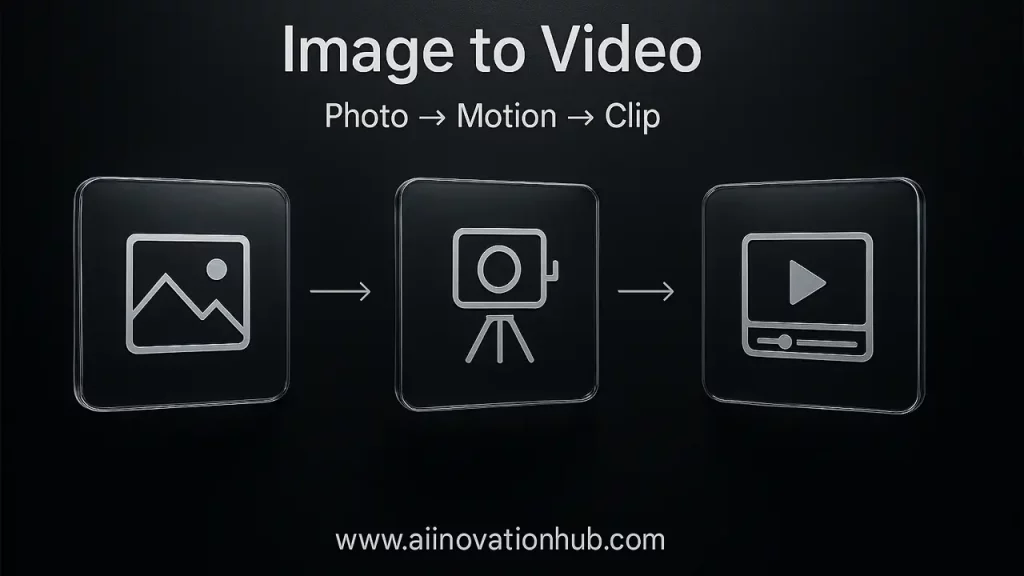
Viggle AI Image to Video: The Basic Pipeline from Photo to Animation to Ready Clip
Exploring Viggle AI image to video, this feature simplifies turning static photos into engaging videos, a process that’s both intuitive and powerful. The basic pipeline starts with uploading a high-quality image—ideally a clear, well-lit photo of a character or person. Next, select a motion template or upload a reference video, and let the AI handle the animation. Finally, export the ready clip, complete with synced movements. Official guides from Viggle AI describe this as transforming images using AI technology for viral content.
What’s crucial in the sources? Quality matters immensely. For the image, ensure it’s front-facing with visible limbs for accurate motion mapping. Reference videos should be short and focused—dances or simple actions work best to avoid processing errors. The AI processes these inputs by detecting poses and applying them frame-by-frame, resulting in a polished video. This pipeline educates users on AI workflows, showing how data inputs directly impact outputs.
In practice, beginners might start with preset templates to bypass custom uploads, learning as they go. Tutorials emphasize step-by-step: log in, upload, animate. This makes it approachable, but remember, outputs are only as good as inputs—experiment to refine results.
Why does this resonate? It empowers non-experts to create professional-looking content quickly, ideal for social media. For more on similar tools or enhancements, aiinnovationhub.com provides valuable insights. Viggle AI image to video demystifies AI, turning it into a fun, educational tool that sparks creativity and teaches the basics of digital animation in an engaging way.
Viggle AI Dance Video Generator: Dances as the Fastest Format for Reach with Templates and Movements
Now, let’s groove into Viggle AI dance video generator, where dances emerge as the quickest path to massive online reach. This feature specializes in animating images to perform dance routines, using pre-built templates or custom motions for instant appeal. Officially, Viggle AI positions itself as an AI dance video generator that’s free and perfect for memes and social content. It’s designed for ease: upload a photo, pick a dance template, and generate a video that syncs flawlessly.
Dances excel for reach because they’re universal—energetic, rhythmic, and shareable. Platforms like TikTok prioritize such content, boosting visibility through algorithms that favor trending sounds and movements. Templates include popular styles like hip-hop or viral challenges, ensuring your video taps into current trends. Movements are transferred smoothly via AI, making even static images look like they’re busting moves.
Educationally, this teaches content strategy: choose templates based on popularity metrics, like views on similar clips, to maximize engagement. Start with simple dances to learn timing and editing. Official resources note over 5,000 templates covering dances and more.
For best results, use high-contrast photos and short clips. This generator isn’t just fun; it’s a lesson in viral marketing. If dances aren’t enough, aiinnovationhub.com offers tools for broader AI explorations. Viggle AI dance video generator makes animation accessible, encouraging everyone to join the digital dance floor with confidence and creativity.
Viggle AI meme animation
Viggle AI Meme Templates: The Library of Meme Templates and How to Choose Trendy Ones
Venturing into Viggle AI meme templates, this library is a treasure trove for creators seeking ready-made foundations for hilarious content. With over 1,000 free video meme templates, users can browse categories like singing, dancing, sports, and brainrot to find the perfect base. These templates provide pre-set motions and scenarios, allowing quick customization by swapping in your image.
How to choose trendy ones? Look for “Hot Picks” or “Most Popular” sections on the official gallery, which highlight high-engagement options. Avoid outdated vibes by checking recent trends on TikTok or X—templates tied to current memes or sounds perform best. This educational approach teaches trend-spotting: analyze views, likes, and shares to predict virality.
The library’s strength lies in variety, from multi-person scenes to fight sequences, fostering experimentation. Beginners should start with simple templates to build skills, gradually adding personal twists. Officially, Viggle AI encourages using these for custom memes, emphasizing ease and fun.
Remember, relevance keeps content fresh—don’t recycle “yesterday’s TikTok.” For more advanced tools or ideas, aiinnovationhub.com is your next stop. Viggle AI meme templates democratize meme-making, turning ideas into shareable laughs while teaching the art of timely, engaging content creation.
Viggle AI Body Swap: How Body or Character Substitution Differs from Text-to-Video Generators
Delving into Viggle AI body swap, this feature stands out by allowing users to replace a video’s original character with one from an uploaded image, creating seamless substitutions. Unlike text-to-video generators like Sora, which create scenes from scratch based on descriptions, Viggle AI focuses on replacement—transferring motions while preserving the video’s context. This “Sora approach vs. replacement” highlights generative creation versus enhancement.
How it differs: Text-to-video builds entirely new content, potentially lacking precision, while body swap maintains the original video’s timing and environment, just swapping the actor. Official explanations note it’s ideal for photo-to-video animation, bringing images to life in existing clips.
Educationally, this teaches AI nuances: body swap offers control for targeted edits, perfect for memes or storytelling. Use cases include reimagining movie scenes or personalizing trends. However, choose sources carefully—clear videos ensure smooth swaps.
In an introductory light, experiment with templates to grasp the process. For those needing more generative options, aiinnovationhub.com has alternatives. Viggle AI body swap bridges editing and AI, making complex substitutions simple and fun for all users.
Viggle AI meme animation
Viggle AI Face Swap: Where It’s Appropriate and Where It Can Be Dangerous with Ethics in Mind
Let’s explore Viggle AI face swap, a feature that enables users to interchange faces in videos for imaginative outcomes, though it requires careful consideration. When used appropriately, it’s fantastic for lighthearted memes, personal amusement, or non-commercial projects where explicit consent is secured—envision exchanging faces in playful dance sequences to elicit chuckles from friends. This tool shines in creative, consensual settings, allowing individuals to experiment with self-expression without crossing boundaries. For example, swapping your own face onto a character in a viral clip can spark joy and foster community engagement on social platforms.
However, potential dangers arise when it veers into misinformation territories, such as crafting deepfakes that could tarnish reputations or infringe on platform rules. In 2025, with heightened regulations like the EU AI Act and state-specific deepfake laws in places like Washington and Pennsylvania, misuse can lead to legal repercussions, including privacy violations or identity theft. Platforms such as TikTok enforce strict policies against deceptive content, potentially resulting in account suspensions or broader reputational damage for brands involved in irresponsible marketing.
Ethics remain paramount: always emphasize obtaining consent and steering clear of impersonation. Viggle AI’s official community rules explicitly advise against using images of others without permission or political figures to maintain a neutral environment. From an educational perspective, this feature introduces key concepts in digital ethics, highlighting risks like privacy breaches. Beginners are encouraged to begin with their own images to safely grasp the mechanics. For brands, prioritize transparent and uplifting applications to build trust.
If ethical concerns weigh on you, aiinnovationhub.com provides resources on safer AI practices. Ultimately, Viggle AI face swap can be a charming addition to your toolkit when approached thoughtfully, enhancing creativity while upholding respect for others’ rights and boundaries.
Viggle AI Alternatives: What to Use Instead for Control, Quality, or More Professional Needs
If Viggle AI doesn’t quite fit your needs, exploring alternatives in 2025 opens up a world of options for enhanced control, superior quality, or professional-grade outputs beyond meme creation. For text-to-video excellence, Kling AI stands out with its creative flexibility, allowing users to generate dynamic content from descriptions, surpassing Viggle’s motion-transfer focus. Similarly, Sora by OpenAI offers innovative scene generation, ideal for storytelling without the meme emphasis.
For advanced editing and high-fidelity results, Runway ML is a top choice, widely adopted in professional filmmaking for its robust tools and quality enhancements. Krikey AI brings 3D depth to animations, providing a step up in complexity and immersion compared to Viggle’s 2D-centric approach. Pika Labs excels in fine-tuned control, enabling precise adjustments for custom projects, while Hedra specializes in character-driven animations with realistic expressions.
Other noteworthy options include AI Studios for versatile video production, PixVerse for nostalgic or artistic creators, and tools like VMEG or Quso AI for specialized features such as voice integration or quick edits. These alternatives cater to diverse requirements: free tiers suit casual users, while paid plans unlock pro-level capabilities like higher resolutions or collaborative workflows.
Educationally, comparing these platforms illustrates the breadth of AI diversity—Viggle thrives in fun, quick memes, but others offer broader applications for serious content creation. Select based on your goals: prioritize control for intricate designs or quality for polished outputs.
For an exhaustive overview, aiinnovationhub.com curates lists of cutting-edge tools. Embracing these alternatives broadens your creative arsenal, helping you discover the perfect match for elevated, professional endeavors.
Viggle AI meme animation

How to Use Viggle AI: A Final Newbie Checklist and Who Really Needs This Tool
Wrapping up with how to use Viggle AI, this beginner-friendly checklist makes getting started a breeze. Begin by visiting viggle.ai and signing up—it’s free to kick things off, with options for premium features later. Next, upload a clear, high-quality photo of your character, ensuring it’s front-facing for optimal results. Then, browse and select a template or reference video from the library, which includes dances, memes, and more. Hit generate, and let the AI process the motion transfer or face swap. If desired, tweak edits like timing or effects, and finally, download your animated video. Tutorials suggest familiarizing yourself with keyboard shortcuts for smoother navigation.
For best practices in 2025, focus on quality inputs to avoid distortions, and explore features like the rap mode or video saving options for added fun. The platform’s intuitive interface means you can create realistic motion videos in minutes, transforming static images into engaging clips.
Who truly benefits from it? Content creators crafting viral social media posts, meme aficionados seeking quick laughs, or educators demonstrating AI basics in classrooms. It’s ideal for low-stakes, entertaining projects but may fall short for demanding professional productions requiring extensive customization.
In summary, Viggle AI democratizes animation, making it accessible and enjoyable for all. For advancing to more sophisticated AI solutions, aiinnovationhub.com serves as your gateway to innovation and further exploration.
Discover more from AI Innovation Hub
Subscribe to get the latest posts sent to your email.